Ryanair
- 3.2
- Rating
- 50.00M
- Installs
- Free
- Price

 Analysis by App-foxy
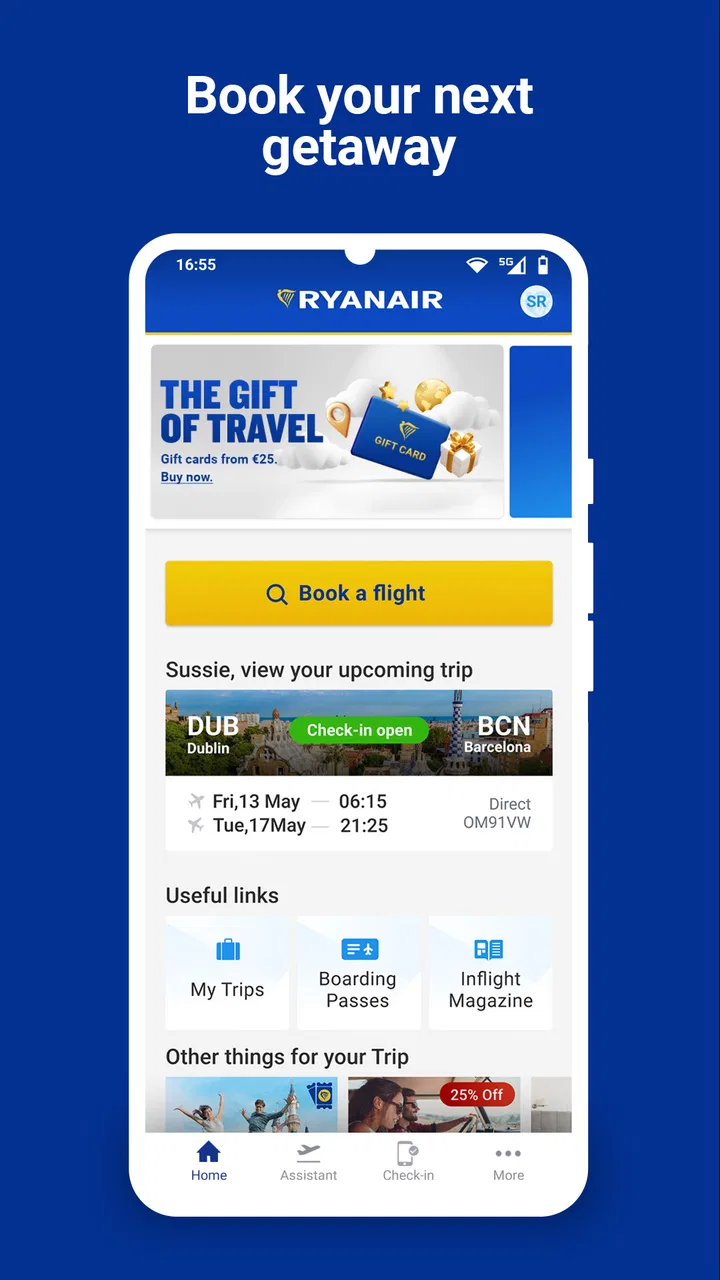
Ryanair’s mobile app is the kind of travel tool I reach for when a flight is already part of the plan and I want to keep the practical details in one place. It is free, aimed at everyone, and belongs to the Travel & Local category, but its real value is narrower than that label suggests: it is most useful for people flying with Ryanair who want to search, book, manage, and check their trip through the airline’s own mobile experience.
I tested it with the mindset of a regular passenger rather than a casual browser. That means looking beyond the first search screen and paying attention to the moments that usually cause stress: choosing the right flight, understanding what has been added to a booking, finding travel information again later, and dealing with the app when time is short. My overall impression is positive, although it is not a universal replacement for every travel app. It works best as a focused companion for Ryanair bookings, not as a complete travel command center.
How I use it from search to travel day
I use the journey in stages: first to narrow down a Ryanair flight, then to check the booking while I still have time to catch any mistaken detail, and finally to retrieve the trip information when I’m on the move. That routine also makes it easier to notice whether a problem is tied to the booking itself or simply to how I’m accessing it.
You May Also Like

 AccuWeather: Weather Radar
AccuWeather Review: A Quick, Clear Forecast for Everyday Decisions
For everyday plans, the best forecast is the one you can understand quickly. AccuWeather makes rain timing, radar, and local conditions easy to act on, with a few trade-offs.

 Hill Climb Racing
Why Hill Climb Racing Still Turns Crashes Into One More Run
A tiny car, a bumpy hill and one more upgrade: Hill Climb Racing keeps resurfacing because its simple chaos makes every near-miss feel personal.

 AliExpress - Shopping App
AliExpress Makes Global Shopping Feel Personal, but Shoppers Bear the Risk
AliExpress turns a global marketplace into a pocket-sized discovery engine. Its reach is useful, its shopping loop compelling, and its trade-offs easy to miss.

 Lords Mobile: Kingdom Wars
Lords Mobile Is a Kingdom-Building Routine, Not a Quick Match
A case-by-case verdict on the building, battles, device demands, and social commitments that make Lords Mobile rewarding for some players and exhausting for others.

 PDF Scanner app - TapScanner
TapScanner Makes Paperwork Easier to Capture, Check, and Share
TapScanner makes scanning with a phone feel less like a rescue operation and more like a dependable step in getting work done. Its capture tools are useful, though not flawless.

 Block Blast!
 Shows How Much a Puzzle Game Can Leave Out
A quiet grid game shows why puzzle players increasingly value instant clarity, repeatable skill and low-pressure play—and where the genre still needs to catch up.
More From Our News Desk
View All News


Starting with a simple flight search
The basic workflow is easy to understand. I open the app, enter the departure and arrival airports, select dates, and review the available choices. This is the part where Ryanair’s direct connection to its own inventory is more useful than a general travel app. I am not comparing a collection of airlines in one screen; I am working directly with the carrier I intend to fly.
That focus can save time when I have already decided that Ryanair is suitable. Instead of moving between a search engine and an airline website, I can continue inside the same app. The trade-off is obvious: if my priority is finding the best combination across several airlines, a broader flight comparison service is usually a better first stop. I use this app after narrowing the decision, or when I specifically want to inspect Ryanair’s own options.
I recommend slowing down during the selection process. Low-cost airline bookings can look straightforward at first, while the final choice depends heavily on what I need to take with me and how much flexibility I want. I read each step rather than tapping through automatically. This habit matters more than speed because a cheap-looking itinerary may not suit a passenger who needs extra luggage, a preferred seat, or a different level of convenience.
Keeping the booking process under control
My preferred approach is to decide the essentials before opening the payment flow. I note the airports, travel dates, passenger names, and baggage needs first. That reduces the chance of making a rushed choice simply because the app presents the next screen quickly. It also makes it easier to spot whether I am selecting the intended route rather than relying on memory.
Once the reservation is made, I treat the app as a reference point for the trip. I return to it instead of searching through old messages whenever I need to revisit the booking. This is particularly helpful for a short city break, where the flight details, passenger information, and airport routine can otherwise become scattered across email, notes, and screenshots.
One practical habit I found useful is checking the booking while I still have time to correct misunderstandings. I do not wait until I am standing in an airport queue to discover that I have overlooked a travel requirement or selected the wrong option. The app makes the booking accessible, but it cannot replace careful reading. Convenience is strongest when I use it as an organized record rather than as a reason to rush.
Using it during an everyday trip
Imagine I am leaving for a weekend away with only a small bag. Before leaving home, I open the app to review the reservation and confirm that the journey I am looking at is the correct one. At the airport, I use the same place to bring the relevant travel information back to the screen instead of relying on a paper printout or a long email search. If a friend asks for the flight details, I can refer to the booking directly rather than reconstructing the itinerary from memory.
That scenario shows the app’s strongest quality: continuity. The same airline account and booking context follow the trip from planning to departure. It is less impressive when I want a broad overview of hotels, trains, airport transfers, and other airlines. For those tasks, I would pair it with a general travel organizer rather than expecting the Ryanair app to handle an entire holiday.
What the app is and who operates it
This is an official Ryanair app developed by Ryanair Limited, rather than an independent booking service. That distinction matters because I am dealing with the airline’s own environment for Ryanair travel. It has been available since October 25, 2012, and the current version is 3.231.0. The stated minimum operating-system requirement is version 9, which makes it accessible on many older compatible devices as well as newer phones.
The app has passed the scale test in a very visible way: it has more than 50 million installs, with an average rating of 3.5 from around 383 thousand ratings and roughly 1.1 thousand written reviews. I read that combination as a sign of a widely used but not universally loved tool. In my experience, that is a fair description. It can be genuinely useful for the right journey, while the experience may feel less smooth when a passenger is trying to solve an unusual problem or make a last-minute change.
Settings and choices worth checking early
I do not treat the first screen as the whole product. Before relying on the app for a trip, I check the account and booking context carefully. I make sure I am signed into the account connected with the reservation, and I confirm that the displayed passenger and flight information match what I intended to book. This is a small step, but it prevents the common mistake of searching for a booking while using a different account or an incomplete detail.
I also review the app’s notification behavior on my phone. Travel alerts are useful only if they can reach me at the right time, so I check whether system notifications are permitted and whether my phone is silencing them through a battery-saving mode or a focus setting. I do not assume that installing an airline app automatically means every alert will appear. The operating system still controls much of that experience.
Another worthwhile check is language and regional presentation. I prefer to set the app up before the journey rather than change important preferences while moving through an airport. If I am travelling with someone else, I also make sure both of us know which person is responsible for the booking and where the relevant details can be found. This avoids the awkward situation where one traveller has the reservation but the other is trying to make decisions without access to it.
There is a useful distinction between app settings and booking choices. A phone setting can affect notifications or access, while a booking selection can affect the trip itself. I slow down especially when moving from general browsing into paid or binding choices. My rule is simple: if a screen changes what I am buying or how I will travel, I read it twice before continuing.
Shortcuts that make repeat use faster
Experienced use is less about discovering secret functions and more about building a repeatable routine. I keep the app easy to find, sign in before I need it, and open the booking from the account area instead of starting a fresh flight search every time. That removes several unnecessary steps when I only want to review an existing journey.
I also separate planning sessions from travel-day checks. During planning, I compare dates and think about baggage or seating needs. On travel day, I avoid changing anything casually and use the app mainly to retrieve the information I already checked. This division makes the interface feel calmer because I am not trying to make a new purchase while also navigating an airport.
For trips with more than one passenger, I write down the decisions we have made before returning to the booking. Who needs which bag? Who is comfortable with the selected seat? Which traveller is carrying the important documents? The app can present the booking, but it cannot resolve disagreements between passengers. A tiny amount of preparation makes the mobile workflow much quicker.
When I am comparing alternative dates, I keep a note of the exact airports and departure times that matter to me. This is especially helpful when nearby airports have similar names or when a route is being considered for a group. I do not rely on a quick glance at the destination label. Checking the full airport information before confirming is one of the most useful habits I can recommend.
Where the focused design helps
The app’s narrow purpose is also its clearest advantage. Because it is built around Ryanair, I can move from the airline’s flight search to its booking context without translating information from a third-party comparison site. That directness is valuable when I already know the carrier I want and need a mobile way to manage the journey.
It is also convenient for travellers who dislike carrying printed documents or searching through a crowded inbox. Having a dedicated place for the airline relationship makes repeat journeys less fragmented. I find this particularly useful for passengers who fly the same carrier more than once and want a familiar workflow instead of learning a different interface for every booking.
The app is free, which removes a barrier to trying it before a trip. Its Everyone content rating also makes it suitable for a broad audience, including families who need to keep travel information available on a shared device. That does not mean every traveller will enjoy the process equally, but it does mean the basic service is approachable rather than aimed at a specialist audience.
Where the usual alternatives are better
I would not use this app as my only travel planning tool for a complicated itinerary. If I am combining airlines, trains, hotels, and local transport, a general itinerary manager gives me a clearer whole-trip view. A comparison service is also more appropriate when price, schedule, and airline choice all need to be evaluated together.
Email can still be better for long-term records because messages are searchable across many travel providers. A calendar is better for seeing the trip alongside work and personal commitments. A map app is better for directions after landing. The Ryanair app does not need to replace those tools; it simply handles the Ryanair portion more directly.
There is another trade-off for people who prefer a website. A larger screen can make side-by-side comparisons and detailed reading more comfortable, especially when several passengers or travel options are involved. I prefer the app for quick access and travel-day convenience, but I would not hesitate to use a browser on a laptop when I am making a careful, multi-person booking.
Limits that become visible with advanced use
The more unusual the request, the less I expect a simple mobile workflow to solve it instantly. A standard booking is one thing; a complicated change, a disputed charge, or a special travel situation requires more patience. I use the app to locate the relevant booking and understand what is already recorded, but I do not assume that every support issue will be resolved by tapping through a few screens.
Connectivity is another practical limit. An airline app is most comfortable when the phone has a stable connection and enough battery. I prepare before leaving home, keep the device charged, and avoid making the airport the first place where I test whether I can access the booking. This is not a criticism unique to Ryanair; it is simply a sensible boundary for any mobile travel tool.
I also avoid treating the displayed information as a substitute for personal responsibility. I check names, dates, airports, and selected extras before committing. If a trip is important, I keep a second record of the essential booking details in a private note or email folder. That backup does not make the app less useful; it protects me from a dead battery, a poor signal, or a moment of confusion.
Privacy and account security deserve ordinary attention too. I use a device lock, avoid leaving my account open on someone else’s phone, and sign out when appropriate. Travel bookings contain personal details, so convenience should not mean careless access. These habits are easy to overlook because the app feels familiar, but they matter more when a phone is lost or shared.
Who should install it
I recommend the app to anyone who regularly flies with Ryanair, especially passengers who want one direct place to search for the airline’s flights and revisit their bookings. It is a good fit for short trips, repeat travellers, and people who prefer handling travel from a phone rather than printing every detail.
It is also worthwhile for families or groups when one person is coordinating the booking and needs quick access while travelling. The key is agreeing in advance who will manage the reservation and checking the passenger details together. That turns the app into a practical shared reference instead of another source of confusion.
I would suggest skipping it as a primary tool if I am still comparing many airlines, building a multi-city itinerary, or expecting a full holiday organizer. In those cases, I start with a broader service and add the Ryanair app only if the final itinerary includes this airline. Travellers who strongly prefer desktop browsing may also find a larger screen more comfortable for the initial purchase.
My final view after building a reliable routine
Ryanair is not remarkable because it tries to do everything. I find it useful because it keeps the airline-specific journey close at hand and supports a straightforward pattern: search when planning, verify carefully before paying, review the booking before leaving, and use the phone as a convenient reference during the trip.
Its 3.5 average rating suggests a mixed public experience, and I can understand why. The app is most satisfying when the booking is ordinary and the traveller knows what they need. It becomes less comfortable when the situation is complicated, the user is rushing, or the phone is being asked to replace every other travel tool.
My verdict is that Ryanair is worth installing if Ryanair is part of your actual travel plans. I would combine it with a comparison service for research, a calendar for the wider itinerary, and a backup note for essential details. Used that way, it is a practical free companion rather than an overpromised all-in-one solution, and that is exactly where I think it delivers the most value.
FAQs for Ryanair
01What features does the Ryanair app offer?
The Ryanair app provides a user-friendly interface for booking flights, checking in online, and managing your bookings. It also offers real-time flight status updates, boarding passes, and the ability to add extras like luggage or priority boarding. Additionally, the app includes a travel wallet and notifications for gate changes and special offers.
02How reliable is the Ryanair app for booking flights?
The Ryanair app is generally reliable for booking flights, offering a seamless experience from flight search to payment. It supports secure transactions and provides immediate confirmation of bookings. However, users should ensure they have a stable internet connection and keep the app updated for optimal performance and access to the latest features.
03Can I manage my bookings through the Ryanair app?
Yes, the Ryanair app allows you to manage your bookings efficiently. You can view and modify your flight details, add extras like checked baggage, and change your seat preferences. The app also enables you to cancel or reschedule flights, though fees may apply. Always check Ryanair’s terms and conditions for specific policies.
04Is the Ryanair app available on both Android and iOS?
The Ryanair app is available on both Android and iOS platforms, ensuring broad accessibility for users. It can be downloaded for free from the Google Play Store and Apple App Store. Regular updates ensure compatibility with the latest operating systems and improvements in functionality and security.
05Does the Ryanair app offer customer support?
While the Ryanair app provides a comprehensive FAQ section and automated assistance, direct customer support is limited within the app. For detailed inquiries or issues, users are encouraged to visit the Ryanair website or contact customer service directly through phone or live chat options available online.
Pros
- User-friendly interface for easy booking.
- Competitive prices with frequent discounts.
- Extensive route network across Europe.
- Fast and efficient mobile check-in.
- Real-time flight status and updates.
Cons
- Frequent in-app ads can be distracting.
- Limited customer support options.
- Additional fees for seat selection.
- No offline access to bookings.
- Occasional app crashes reported.

Ryanair
Gallery